A few months ago, a client in the international pilgrimage travel space asked me to help them prepare for an upcoming Google Ads campaign.
They were offering high-ticket journey packages with multiple travel routes, strict visa requirements, and complex logistics.
They had an existing multi-page business website.
The problem was familiar.
The main website had too many navigation links, slow page load times, and generic forms that dumped inquiries into an unorganized email inbox.
Sending expensive Google Ads traffic to a general home page or a slow brochure site is one of the fastest ways to burn a marketing budget.
Visitors click on an ad looking for specific pricing or route dates. If the page takes three seconds to load, or if they have to hunt through menus to find an inquiry button, they bounce.
We decided to build a dedicated landing page from scratch.
Note: To respect client confidentiality, all business names, domains, URLs, personal names, phone numbers, and identifying details have been removed or replaced with generic placeholders in this case study.
What the project actually required?
Before writing any code, I looked at competitor landing pages and analyzed the keyword data from Google Keyword Planner.
In this industry, search queries are rarely generic.
People search with high intent:
- Specific route names (overland by road, flight via Tibet, or private helicopter)
- Cost, price, and package inclusions
- Departure schedules for the upcoming travel season
- Group travel and senior-citizen accommodations
That gave us clear requirements for the landing page:
- Sub-second loading speed: Google Ads Quality Score rewards fast landing pages with lower cost-per-click (CPC) rates.
- Immediate message match: The hero section had to match the search query with transparent pricing anchors and route options right away.
- Low-friction inquiry mechanisms: A simple form above the fold, direct WhatsApp chat options, and an exit-intent quote modal.
- Reliable lead capture with zero SaaS overhead: No fragile Google Sheets integrations or recurring subscriptions to bloated CRM software.
- Rock-solid attribution: Tracking
gclid, iOS click identifiers, and UTM parameters all the way to conversion.
Why I replaced Next.js with Astro and Cloudflare?
I originally started prototyping the landing page using Next.js 16, Tailwind CSS, and a popular React component library.
It looked nice.
Then I ran a build and checked the client bundle size.
The page was shipping hundreds of kilobytes of JavaScript just to display text, a few package cards, an FAQ accordion, and a form.
For an interactive web application, React makes sense.
For a Google Ads landing page where cold mobile visitors arrive on cellular data, heavy client-side JavaScript is just dead weight.
So I scrapped the Next.js prototype and moved the entire project to Astro and Cloudflare Workers.
Initial Prototype:
Next.js 16 + Radix UI + Framer Motion → 200KB+ client JS bundle

Final Production:
Astro 4 (Static) + Hono Worker + Cloudflare D1 → Pure static HTML/CSS + 0KB framework JS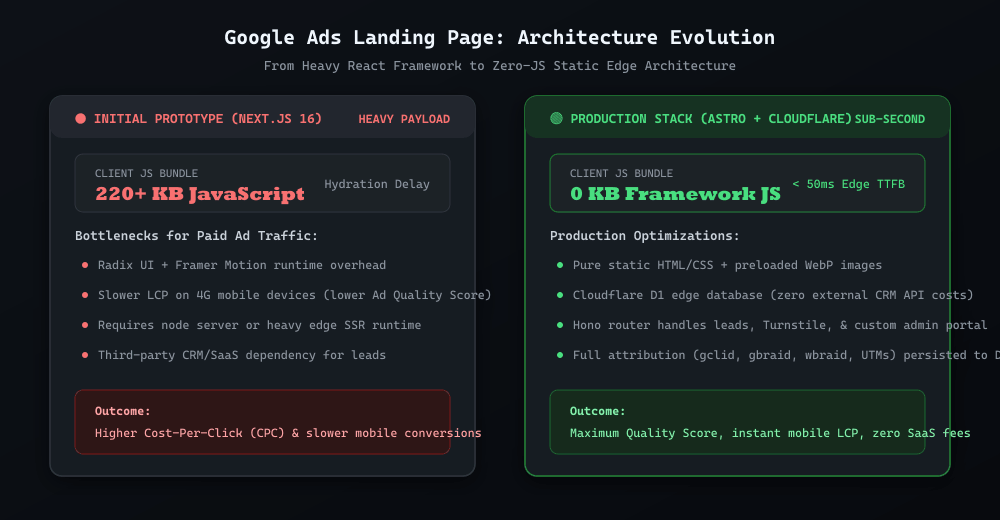
Astro compiles to static HTML and CSS by default. The visitor gets the content immediately without waiting for a JavaScript runtime to hydrate the page.
For the backend, I did not want an external server or a separate database service.
I paired Astro with a lightweight Hono router running directly on Cloudflare Workers, backed by Cloudflare’s serverless SQLite database, D1.
The static assets live on Cloudflare’s edge CDN, and API requests hit the Worker running in the exact same network.
How the landing page was structured?
A high-converting landing page needs a logical narrative. It must answer questions in the exact order a skeptical visitor thinks of them.
Here is how the page sections were laid out:
Topbar (Direct phone & instant WhatsApp links)
  ↓
Hero Section (Headline, price anchor, trust bullets, high-intent lead form)
  ↓
Credibility & Safety (Years of operation, medical gear, government permits)
  ↓
Package Options (Road, Lhasa flight, Helicopter with transparent starting prices)
  ↓
Detailed Itineraries (Route breakdown addressing specific search terms)
  ↓
Social Proof (Pilgrim testimonials with verified photos)
  ↓
FAQ Section (Permits, age limits, altitude preparation, with JSON-LD schema)
  ↓
Final CTA (Quick consultation push & floating WhatsApp button)
1. The Hero and Intent Matching
Cold search visitors decide whether to stay within five seconds.
The hero section was split into two columns on desktop:
- On the left: A high-contrast headline confirming the 2026 travel season, transparent package starting prices, and trust points (such as “1,000+ pilgrims assisted” and “All-inclusive permit handling”).
- On the right: A clean, 3-field inquiry form visible immediately without scrolling.
If someone searches for package pricing, they see prices in the first viewport. If they want a customized itinerary, the form is right next to the headline.
2. Route Segmentation
One of the key findings from competitor research was that route intent is distinct.
A traveler looking for an overland road package has a different budget and physical requirement than someone looking for a helicopter flight.
Instead of hiding this information in downloadable PDFs, we created dedicated cards for each route option:
- Overland Route: Entry-level pricing, detailed acclimatization schedule.
- Flight Route: Mid-tier comfort, cultural stops.
- Helicopter Route: Premium option designed for senior citizens and pilgrims with limited time.
Each route card included a direct “Inquire for this route” button that scrolled directly to the lead form and pre-selected the travel choice.
Designing the form and stopping bot spam
Forms on Google Ads pages face two challenges: visitor drop-off from too many fields, and automated spam submissions that pollute campaign conversion data.
Field Optimization
During early iterations, the form had fields for travel month, group size, and custom notes.
Every extra field lowered completion rates.
We cut the form down to three essentials:
- Full Name
- Phone / WhatsApp Number (with a clean country code dropdown defaulting to target campaign countries like India, Singapore, and Malaysia)
- Email Address
User fills 3 fields
  ↓
Hidden Honeypot Field check (Bots fill it, humans cannot see it)
  ↓
Silent Cloudflare Turnstile token validation
  ↓
Normalized phone digits + country code
  ↓
POST /api/lead (Hono Worker on Cloudflare edge)
Invisible Spam Defense
To stop bots without forcing real users to click distorted pictures of fire hydrants, I used a two-layer defense:
- A honeypot input: A hidden text field positioned far off-screen (
left: -9999px) withtabindex="-1". Normal visitors never see or fill it. Automated scraper bots fill every field they find. If the field contains any text on submission, the worker returns a silent200 OKsuccess response without saving the lead to the database. - Cloudflare Turnstile: An invisible CAPTCHA alternative that verifies real visitor behavior in the background without layout shifts or intrusive challenges.
Zero-dependency lead management with Hono and D1
Most client projects handle landing page inquiries in one of two ways:
- Send an email notification (which frequently lands in spam or fails when SMTP credentials expire).
- Send data via webhook to an external tool or spreadsheet (which breaks when schema or API limits change).
I wanted a self-contained system.
The form posts directly to /api/lead, handled by our Hono Worker:
// worker/index.ts (simplified excerpt)
app.post('/api/lead', async (c) => {
  const body = await c.req.json();

  // 1. Check honeypot
  if (body.website) {
    return c.json({ success: true }); // Silent discard
  }

  // 2. Validate input schema with Zod
  const validation = leadSchema.safeParse(body);
  if (!validation.success) {
    return c.json({ error: 'Invalid input' }, 400);
  }

  // 3. Insert directly into Cloudflare D1
  await c.env.DB.prepare(`
    INSERT INTO leads (
      full_name, phone, email, desired_package,
      gclid, utm_source, utm_campaign, created_at
    ) VALUES (?, ?, ?, ?, ?, ?, ?, unixepoch())
  `).bind(
    body.name,
    body.phone,
    body.email,
    body.desired_package || 'General Inquiry',
    body.gclid || null,
    body.utm_source || null,
    body.utm_campaign || null
  ).run();

  return c.json({ success: true });
});
Because the database is Cloudflare D1, it lives on Cloudflare’s global network alongside the Worker. There is no external database connection overhead, no connection pooling to configure, and zero hosting cost for typical landing page volumes.
The Built-in Admin Dashboard
To make lead management effortless for the client, I built a lightweight admin dashboard right into the worker at /admin/leads.
It provides:
- Secure login using bcrypt password hashes and signed 24-hour HMAC session cookies.
- IP rate limiting on login attempts to block brute-force attacks.
- A clean queue view of incoming leads with status tags (
new,contacted,qualified,converted,lost). - A direct WhatsApp link next to every lead that automatically formats the phone number and opens a pre-composed template.
- Export options and pipeline stage filters.
The client did not need to sign up for another SaaS dashboard or learn a new tool. They just open the admin link on their phone or laptop, log in, and tap the WhatsApp button to follow up with new inquiries.
Tracking, attribution, and Google Ads compliance
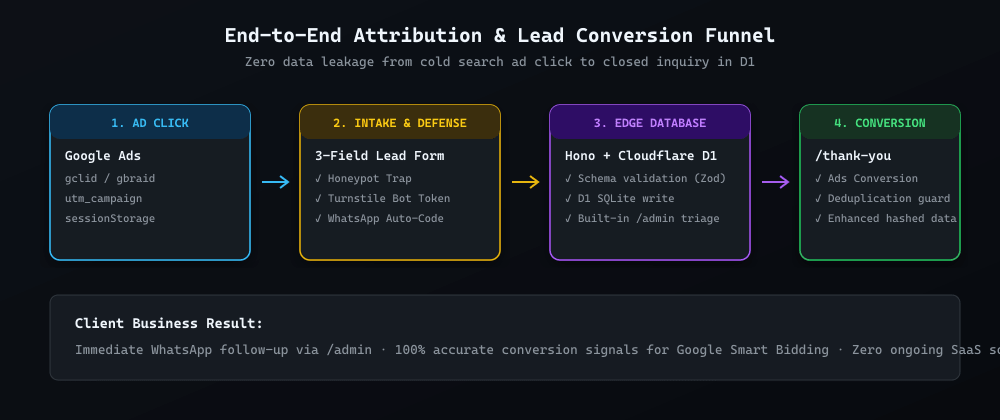
A landing page is only as good as its measurement.
If Google Ads cannot see which clicks turn into inquiries, Smart Bidding algorithms have no data to optimize against.
1. Preserving Attribution Across the Journey
When a visitor clicks an ad, Google attaches parameters like gclid (or gbraid/wbraid on iOS devices), along with your UTM campaign tags.
We capture these parameters the moment the page loads and store them in sessionStorage:
(function persistUtmParams() {
  try {
    const params = new URLSearchParams(window.location.search);
    const keys = ['gclid', 'gbraid', 'wbraid', 'utm_source', 'utm_campaign', 'utm_medium'];
    for (const key of keys) {
      const value = params.get(key);
      if (value) sessionStorage.setItem(key, value);
    }
  } catch {}
})();
When the user submits the form or clicks a WhatsApp contact button, those stored parameters are passed along. We know exactly which campaign, ad group, and keyword generated the lead.
2. Deduplicated Conversions on the Thank-You Page
When the form submission succeeds, the browser redirects to a dedicated /thank-you route.
A common tracking bug on landing pages is conversion inflation: if a user refreshes the thank-you page or visits it again later, Google Ads records duplicate conversions.
To prevent this, the thank-you page checks a session storage guard before firing the event:
(() => {
  const alreadyFired = sessionStorage.getItem('thank_you_conversion_fired') === '1';
  if (alreadyFired) return;

  if (typeof window.gtag === 'function') {
    window.gtag('event', 'conversion', {
      send_to: adsConversionSendTo,
      value: 1,
      currency: 'USD',
    });
  }

  sessionStorage.setItem('thank_you_conversion_fired', '1');
})();
We also set:
<meta name="robots" content="noindex, follow, noarchive" />This prevents search engine crawlers from indexing the ad page or thank-you page as organic search results, while still allowing Google Ads bots to verify destination compliance.
Performance optimization and image diet
During initial testing, the Largest Contentful Paint (LCP) was slower than I wanted because of high-resolution hero and testimonial images.
I ran a performance pass:
- Native Astro Image Pipeline: Moved all raster assets from
public/intosrc/assets/images/and routed them throughastro:assets. Avatars that were originally 90KB were scaled and converted to WebP at 1KB. - Preloading Critical Viewport Assets: Preloaded the mobile and desktop hero background WebP images directly in the
<head>of the layout:<link rel="preload" as="image" href="/images/hero-mobile.webp" media="(max-width: 768px)" type="image/webp"> <link rel="preload" as="image" href="/images/hero-bg.webp" media="(min-width: 769px)" type="image/webp"> - Resource Hints: Added
preconnectanddns-prefetchtags for Google Tag Manager and Google Analytics domains to eliminate handshake latency. - Immutable Asset Caching: Configured Cloudflare cache headers so all static CSS, fonts, and WebP images are cached for one year.
The result was an instant first load, even on standard mobile 4G connections.
How it was deployed?
The entire deployment workflow is driven by two commands in package.json:
# 1. Compile Astro static build and run local Worker + D1
pnpm worker:dev

# 2. Build and deploy to Cloudflare global edge
pnpm worker:deploy
The build script compiles Astro’s static output into ./dist. Then wrangler uploads both the static directory and the compiled Hono worker to Cloudflare Workers.
DNS was configured directly within Cloudflare by attaching a dedicated sub-domain to the worker. SSL certificates and HTTP/3 edge termination were handled automatically.
What worked well?
A few decisions made a big difference in how smoothly this project ran:
Moving away from heavy JS frameworks
Switching from Next.js to static Astro was the best decision of the project.
There are no client-side hydration delays, no bundle size warnings, and no unnecessary runtime dependencies. The landing page feels like an instant static document because it is one.
Keeping the database at the edge
Using Cloudflare D1 meant we did not need to provision an external database, configure VPCs, or manage connection strings. The Worker reads and writes to D1 with native TypeScript types and zero connection delay.
Building a direct admin queue
Giving the client an easy /admin/leads dashboard with one-tap WhatsApp links removed a huge amount of friction. Instead of digging through emails, their sales team could respond to inquiries within minutes of submission.
In high-ticket travel, speed to lead makes a major difference.
What I would do differently next time?
Automated SMS or WhatsApp notifications on lead intake
Currently, the client checks the admin dashboard or their notifications periodically.
For a future version, I would add a lightweight webhook call inside the Hono Worker to trigger an immediate WhatsApp or Telegram notification to the client’s sales team the second a lead arrives.
Multi-variant headline testing
We optimized the copy based on search volume and competitor gaps, but running automated A/B tests on the hero headline directly at the edge via Cloudflare Workers would give faster confirmation on which angle converts best.
Final thoughts
A high-performing Google Ads landing page does not need complex infrastructure.
It needs:
- Fast page loads.
- Clear message match that answers search intent immediately.
- Low-friction forms that work reliably on phones.
- Accurate attribution tracking.
- A straightforward way for the client to contact new leads quickly.
By keeping the frontend static with Astro and running the backend on Cloudflare Workers and D1, we built a rock-solid, low-cost system that loads in under a second and gives the client full ownership of their lead pipeline.