I have been seeing DeepSeek everywhere lately.
Twitter, Reddit, benchmarks, random AI posts, people comparing prices, people saying it is insanely cheap, people saying it is surprisingly good.
You know how it goes.
At some point I thought, okay, instead of reading another benchmark, why not just try it myself?
So I added $5 to my DeepSeek API account.
Nothing serious.
Just $5 to play around with it and see what all the hype is about.
Then I found something much more interesting.
I could use DeepSeek inside Codex.
And since I already use Codex for coding (alongside Antigravity for agentic workflows), this immediately became more interesting than calling the API manually.
What I wanted to do
Basically, I wanted this:
Codex GUI
   ↓
DeepSeek API
   ↓
DeepSeek V4 Flash
   ↓
My project
I still wanted to use the Codex interface and workflow.
I just wanted DeepSeek to be the model running underneath it.
Turns out Codex supports custom model providers, and DeepSeek supports the Responses API format that Codex uses.
So I decided to set it up on Windows.
I am using Codex GUI on Windows
One thing I was confused about initially was whether I needed to use Codex CLI.
I mostly use the Codex GUI, so I did not really want to move my entire workflow into PowerShell just to test DeepSeek.
Luckily, that is not necessary.
Codex GUI, Codex CLI and the IDE integration use the same .codex configuration directory.
I first checked whether that directory already existed.
In PowerShell:
Test-Path "$env:USERPROFILE\.codex"Mine returned:
TrueSo I was good to continue.
Running the DeepSeek Codex setup
DeepSeek provides a PowerShell setup script for Codex.
I ran:
irm https://cdn.deepseek.com/api-docs/codex-deepseek-setup-en.ps1 | iexIt gave me this menu:
Codex DeepSeek Setup

Choose an action:

1. Configure Codex to use the deepseek-v4-flash model
2. Configure Codex to use the deepseek-v4-pro model
3. Restore the default Codex configuration
I selected:
1because I wanted:
deepseek-v4-flashFor now, I am mostly interested in testing how good the cheaper model is for normal coding tasks.
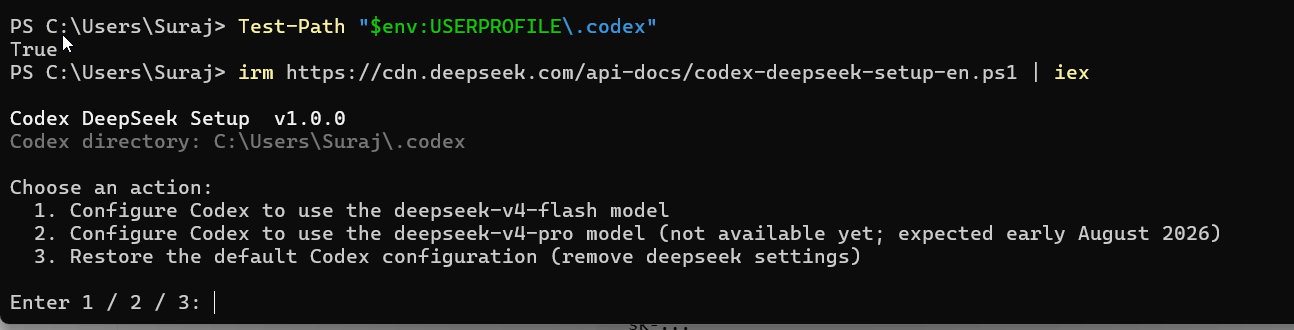
The script then asked for my DeepSeek API key.
Obviously, do not share that API key anywhere.
After entering the key, the installer automatically updated my Codex configuration.
What the installer changed
The setup script backed up my existing Codex config first.
That was nice because I did not want to destroy my current setup just for an experiment.
It then changed my default model from:
gpt-5.6-terrato:
deepseek-v4-flashIt also changed the reasoning effort from:
mediumto:
highMy config now points to DeepSeek like this:
model = "deepseek-v4-flash"
model_reasoning_effort = "high"

model_provider = "deepseek"

model_catalog_json = "C:/Users/Suraj/.codex/models.json"

[model_providers.deepseek]
base_url = "https://api.deepseek.com/"
wire_api = "responses"
There are some authentication fields too, but I am obviously not going to paste my API key here.
The important parts are:
model = deepseek-v4-flash
provider = deepseek
API = https://api.deepseek.com/
So at this point Codex is configured to send requests to DeepSeek.
It also creates a custom model catalog
The installer created this file:
C:\Users\Suraj\.codex\models.jsonI checked that the DeepSeek model was actually inside it:
Select-String -Path "$env:USERPROFILE\.codex\models.json" -Pattern "deepseek-v4-flash"And I got:
"slug": "deepseek-v4-flash"
"display_name": "DeepSeek-V4-Flash"
So everything looked correct.
Then Codex showed “Custom”
This part confused me for a bit.
After restarting the Codex GUI, I expected the model selector to show:
DeepSeek-V4-FlashInstead, it showed:
Customwith:
Effort: High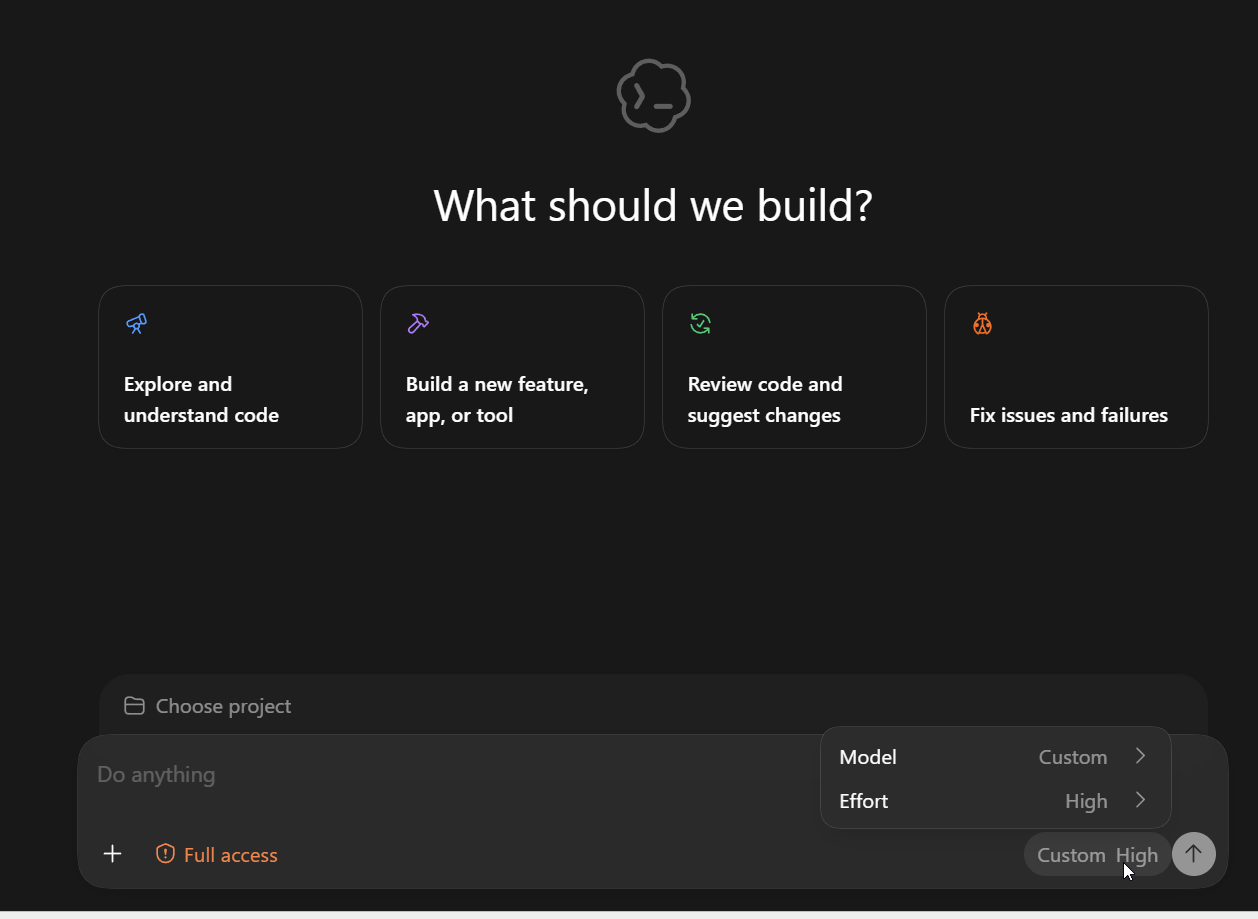
At first I thought something had gone wrong.
So I checked the actual Codex configuration again:
Select-String -Path "$env:USERPROFILE\.codex\config.toml" -Pattern '^(model|model_provider|model_catalog_json|model_reasoning_effort)\s*='And this is what I got:
model = "deepseek-v4-flash"
model_reasoning_effort = "high"
model_provider = "deepseek"
model_catalog_json = "C:/Users/Suraj/.codex/models.json"
So the config itself is correct.
Codex is pointing to DeepSeek V4 Flash.
The GUI is just showing the provider as Custom instead of showing the nice model name.
Not ideal, but also not a big deal.
What matters to me is where the API request is actually going.
So what is actually happening?
My setup now looks like this:
My project
    ↓
Codex
    ↓
DeepSeek Responses API
    ↓
deepseek-v4-flash
    ↓
My DeepSeek API balance
That last part is important.
When I use DeepSeek this way, I am paying through my DeepSeek API balance.
It is not using my normal ChatGPT or Codex model allowance.
That is why I only added $5 for now.
I want to see how far $5 actually goes when using it for real development work.
Why I picked V4 Flash
I am not trying to find the most powerful possible model here.
I am more interested in the price to performance ratio.
If V4 Flash can handle things like:
- understanding an existing codebase
- debugging
- creating features
- editing multiple files
- writing tests
- refactoring
- explaining unfamiliar code
- doing normal day to day coding
then I would rather use the cheaper model for those tasks.
If I hit something genuinely difficult, then I can always try a bigger model later.
But there is no point paying more just because a model exists.
The cool part is not even DeepSeek
The thing I find most interesting here is actually the separation between the coding tool and the model.
Previously, using an AI coding tool usually meant using whatever model that tool gave you.
Now it is starting to look more like:
Coding Agent
     +
Model Provider
Those are becoming two separate choices.
I can like the Codex workflow but still experiment with DeepSeek underneath it.
That is pretty cool.
It also means I can potentially use different models for different types of work.
Maybe one cheap model for normal coding.
Maybe another model for harder debugging.
Maybe another one for architecture or deeper reasoning.
We will see.
Can I go back to my original Codex model?
Yes.
The DeepSeek installer automatically backed up my original configuration.
If I want to switch back, I can just run:
irm https://cdn.deepseek.com/api-docs/codex-deepseek-setup-en.ps1 | iexand choose:
3to restore the previous configuration.
So there is not much risk in experimenting with this.
Was the $5 worth it?
Too early to say.
I literally added the money because I wanted to see what all the DeepSeek hype was about.
But now that I have it running inside Codex, I am actually more interested in testing it properly.
I want to see:
- how fast it burns through my $5
- how good it is with real repositories
- whether it follows instructions properly
- how it handles multi-file edits
- how good it is at debugging
- how much context Codex sends
- whether I notice a big quality difference compared to the models I normally use
- whether the cost difference actually matters in real usage
Benchmarks are nice.
But personally, I care more about questions like:
Can you fix this annoying bug in my actual project without breaking five other things?
That is the benchmark I want to run.
For now
So yeah.
I started with:
$5 in DeepSeek creditsmostly because of the hype.
And somehow ended up with:
Codex GUI
   ↓
DeepSeek V4 Flash
   ↓
My actual projects
Now I am going to use it for a while and see how it performs.
Once I have used enough of that $5 balance, I will probably write another post about the actual experience.
Things like:
How much did it cost?
How good was it for coding?
How quickly did I burn through $5?
Would I keep using it inside Codex?
That will be a much more interesting comparison than another benchmark screenshot (similar to how I tested Antigravity Flash 3.7 High for deep system diagnostics or paired Codex with Antigravity’s browser agent to publish Flutter app updates to Google Play).
For now, it works.
And connecting DeepSeek to Codex was much easier than I expected.