I started learning Apache Spark 4 through the Databricks Certified Associate Developer for Apache Spark 4 course.
Before jumping into PySpark, DataFrames, and transformations, I wanted to know why Spark exists in the first place. That meant going back to Hadoop, HDFS, and MapReduce.
I also wanted a real place to practise. Earlier, I hit a RequestDisallowedByAzure region block on my Azure for Students account. After switching to Korea Central, my Azure Databricks workspace finally deployed.
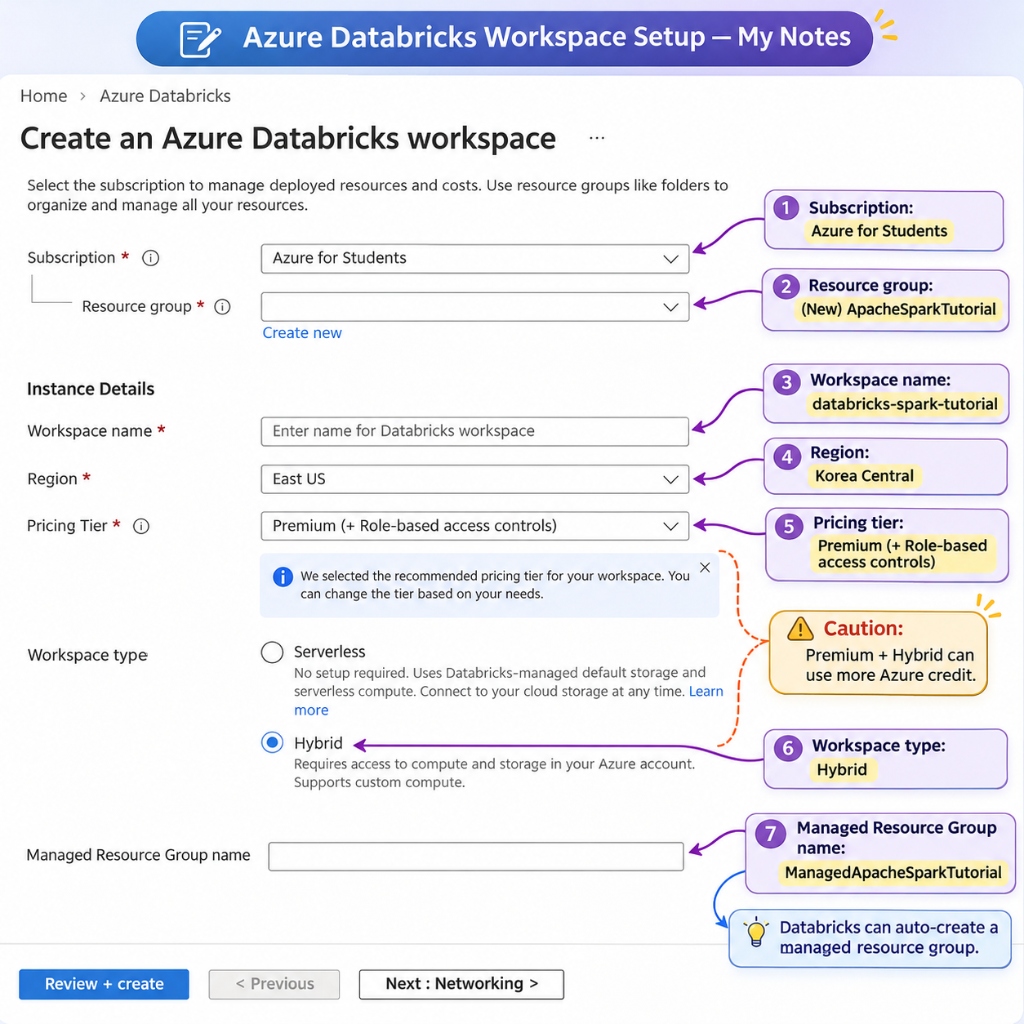
This is Part 1 of my notes. I have not written or run any PySpark code yet. So far, this covers the core ideas I studied and the workspace setup.
The Problem Spark Solves
Suppose you have millions of sales records split across hundreds of files.
You want total sales by city.
If the data fits in RAM on your laptop, Python and Pandas work fine. You do not need a cluster for that.
Problems start when the data grows too big for one machine.
You have two options at that point:
- Vertical scaling: Buy a bigger machine with more RAM and CPU. This hits hardware and cost limits fast.
- Horizontal scaling: Split the work across many regular machines working together.
Distributed computing takes the second route. That is the problem tools like Hadoop and Apache Spark were built to solve.
Hadoop, HDFS, and MapReduce
Before Spark came along, Hadoop made large-scale distributed processing practical.
Hadoop is not one single tool. The main pieces are:
- HDFS (Hadoop Distributed File System): Stores huge files across many machines.
- YARN: Manages CPU and memory across the cluster.
- MapReduce: Processes data in batches using Map and Reduce steps.
How HDFS Works?
Take a 256 MB file and set HDFS to a 128 MB block size.
HDFS splits that file into two 128 MB blocks. It stores them on DataNodes.
A separate NameNode tracks where every block lives. DataNodes hold the actual file chunks.
HDFS also copies blocks to other machines as replicas. If one DataNode crashes, the cluster reads the missing chunk from a surviving copy.
Here is the main thing I wanted to remember: HDFS is only for distributed storage. It does not run your data logic.
How MapReduce Works?
MapReduce breaks a job into three steps:
- Map: Read input records and output key-value pairs.
- Shuffle and Sort: Group records that share the same key.
- Reduce: Combine the grouped values into the final answer.
Take sales records from Melbourne and Sydney:
Map output:
  (Melbourne, 100)
  (Sydney, 200)
  (Melbourne, 300)
        ↓
Shuffle and Sort (group by key):
  Melbourne → [100, 300]
  Sydney    → [200]
        ↓
Reduce output:
  Melbourne: 400
  Sydney: 200
Different machines can process different slices of the input at the same time.
The downside shows up in multi-step jobs. Classic MapReduce often writes intermediate results back to disk between jobs, then reads them again. That slows everything down when you chain several steps.
Why Apache Spark?
Apache Spark gives you a faster and more flexible engine.
Classic MapReduce forces each job into separate disk stages. Spark instead builds a Directed Acyclic Graph (DAG) of your steps. That lets Spark plan and optimize the whole pipeline before running it.
Spark can also cache intermediate datasets in memory when you reuse them.
It ships with built-in APIs for several workloads:
- PySpark and DataFrames
- Spark SQL
- Structured Streaming
- Machine learning
- Distributed batch jobs
One myth I wanted to clear up early: Spark does not keep everything in RAM all the time.
That is false. Spark still reads from and writes to storage. Operations like shuffles also hit both disk and network.
Spark did not replace all of Hadoop either. Spark can still use HDFS for storage and YARN for cluster management. It mainly replaces classic MapReduce as the processing engine.
Spark Architecture Basics
I also started learning how Spark lays out work across a cluster.
| Component | What I understand so far |
|---|---|
| Driver | Coordinates the Spark app and schedules tasks |
| Cluster Manager | Allocates cluster CPU and memory |
| Worker Node | A machine in the cluster that runs Spark processes |
| Executor | A process running on a worker node that runs tasks |
| Core | One CPU slot available to run a task |
| Task | One single unit of computation |
| Partition | One chunk of the distributed dataset |
Suppose an app gets two executors, and each executor has two CPU cores.
If each task takes one core, Spark can run up to four tasks at once.
Suppose a stage has eight tasks. With four cores free, they run in about two waves if tasks take similar time.
One distinction stood out for me: a worker node is the machine, while an executor is a process running inside that machine.
I still need to study jobs, stages, tasks, lazy evaluation, and query plans in more detail.
Why I Chose Azure Databricks?
You can install Spark locally on one laptop. You can also run it on clusters with YARN or Kubernetes.
I went with Azure Databricks for practice.
Earlier, I connected to Databricks locally when setting up my first dbt project. For Spark, I wanted a managed workspace for PySpark notebooks and cluster jobs. Later, I can also test Delta Lake and Unity Catalog there.
The main goal is still learning Apache Spark. Azure Databricks is just where I am running it.
Creating My Azure Databricks Workspace
Yesterday, East US and Australia East both failed with RequestDisallowedByAzure. I checked my Azure Policy allowed locations. Korea Central turned out to be one of two supported Databricks regions on my student account.
I searched for Azure Databricks in the Azure Portal and created a new workspace with these settings:
| Setting | Value |
|---|---|
| Subscription | Azure for Students |
| Resource group | ApacheSparkTutorial |
| Workspace name | databricks-spark-tutorial |
| Region | Korea Central |
| Pricing tier | Premium (+ Role-based access controls) |
| Workspace type | Hybrid |
| Managed resource group | ManagedApacheSparkTutorial |
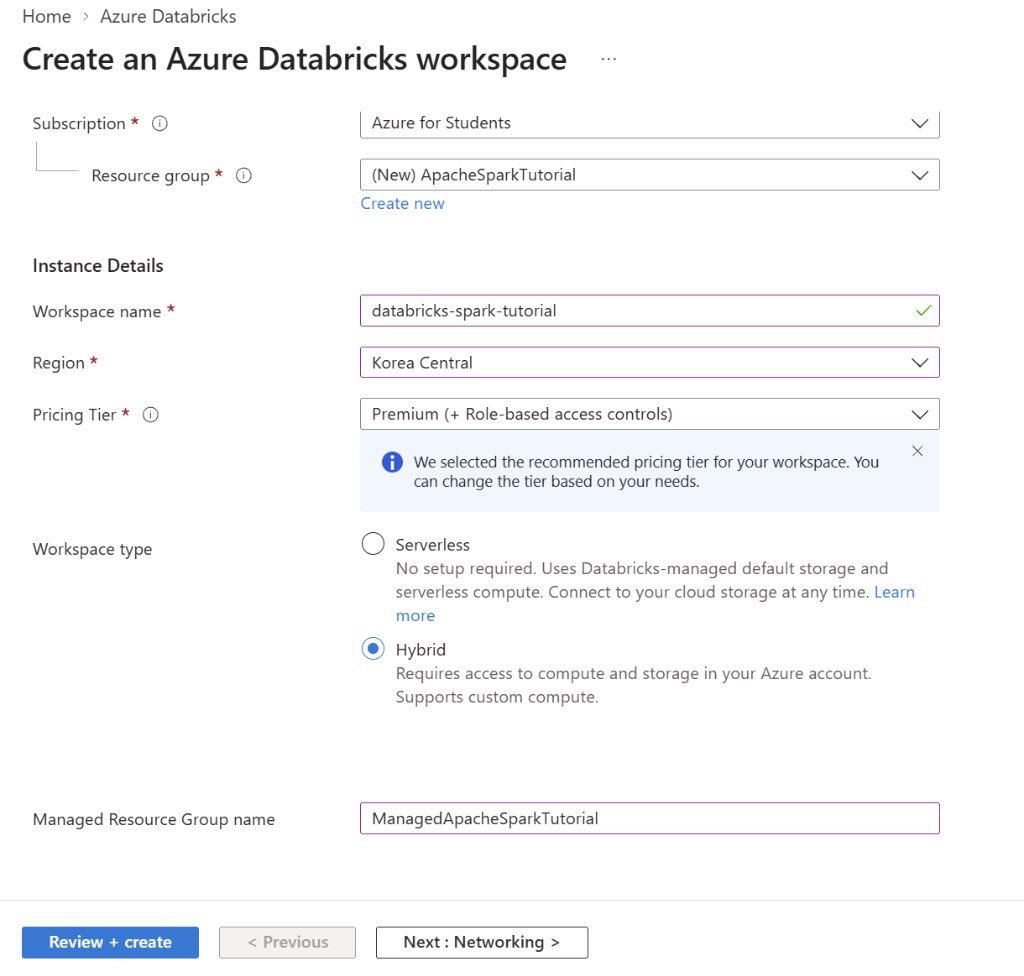
I picked the Hybrid workspace type so I can use classic compute and storage inside my Azure subscription.
When I moved to Review + create, validation passed right away for Korea Central.
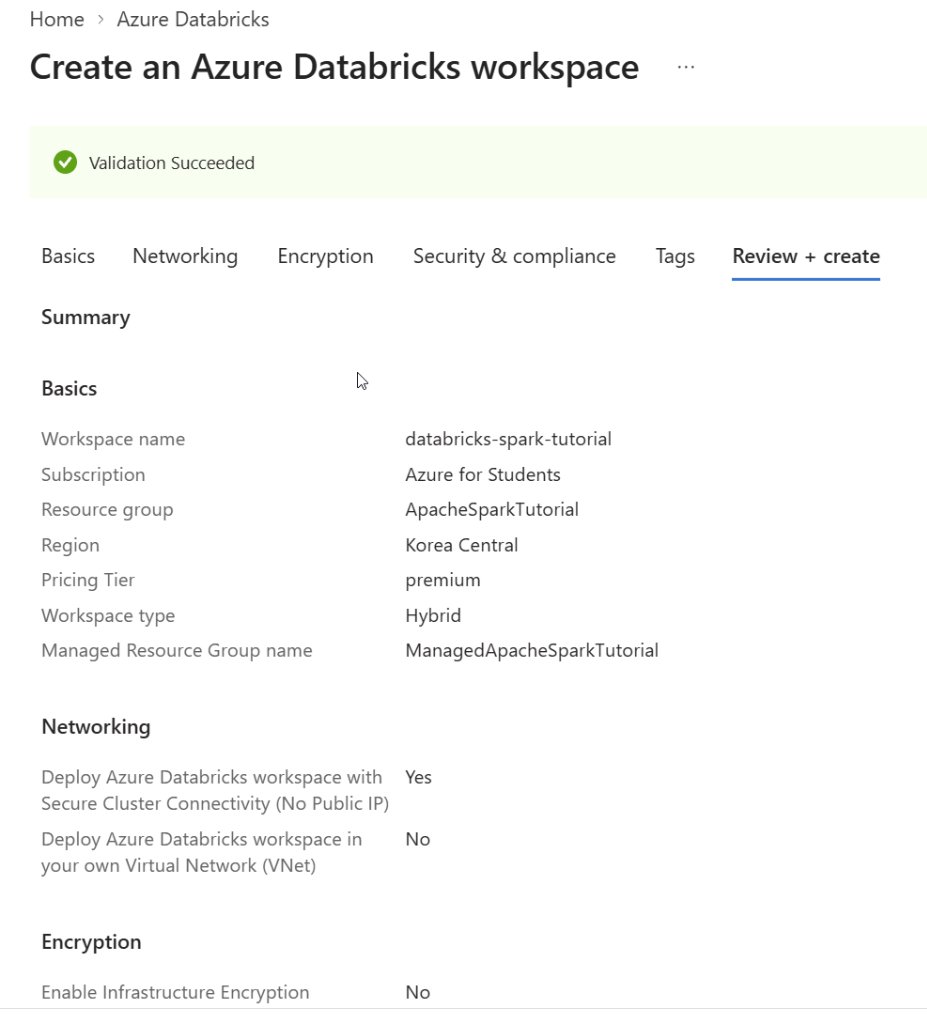
Why Three Resource Groups Showed Up?
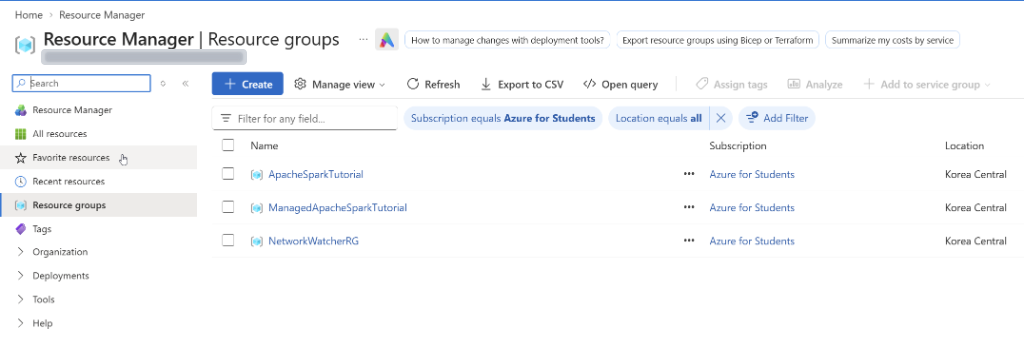
After deploying, I checked my Resource groups page and saw three groups instead of one:
- ApacheSparkTutorial: The group I created. It holds the main Azure Databricks workspace resource.
- ManagedApacheSparkTutorial: The managed resource group that Databricks creates for supporting compute, storage, and networking resources.
- NetworkWatcherRG: Created automatically by Azure Network Watcher for network monitoring and diagnostics.
Seeing extra resource groups confused me for a moment. They are not extra Databricks workspaces. They are supporting infrastructure.
Deployment Completed
Once I hit Create, Azure started provisioning. A bit later, the status switched to Your deployment is complete.
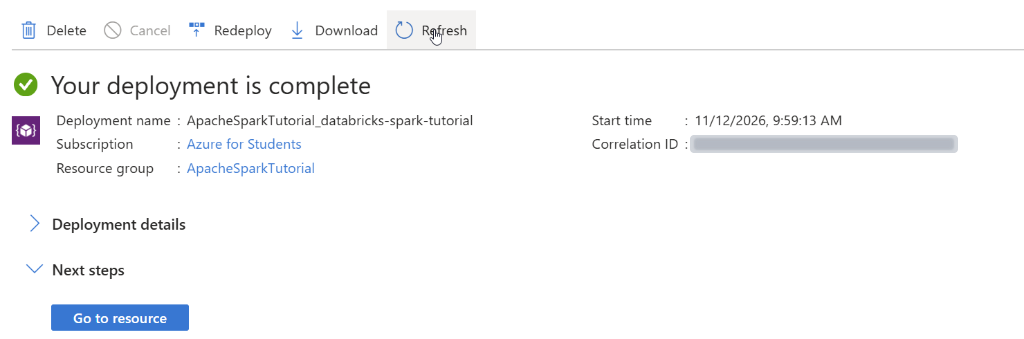
From there, I clicked Go to resource and then Launch Workspace.
Looking Around the Databricks UI
Signing in dropped me onto the Databricks homepage.
A few sidebar sections stand out for what I will use next:
- Workspace: Notebooks and project files.
- Compute: Clusters that actually run Spark workloads.
- Catalog: Tables, schemas, and data governance.
- Jobs & Pipelines: Scheduled workflows.
- SQL Editor: Running SQL queries directly.
- Data Ingestion: Loading files and tables.
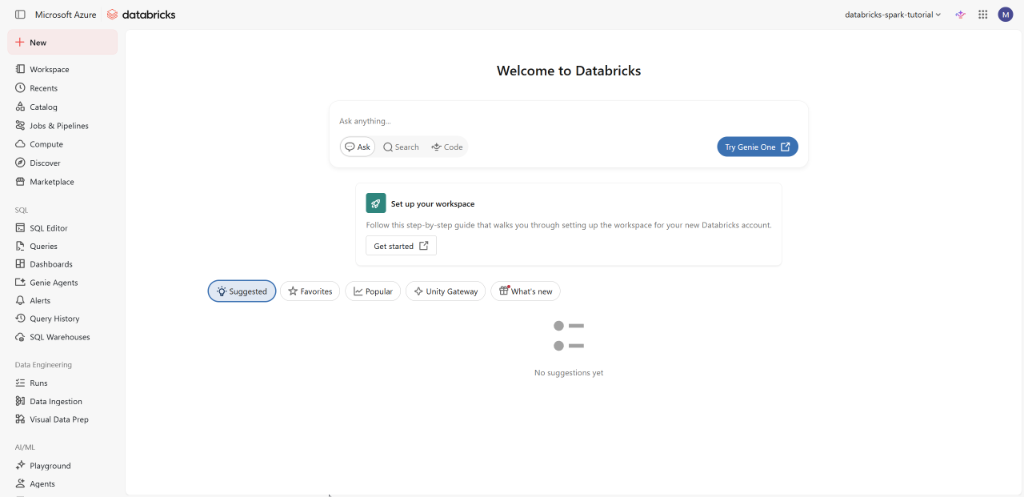
For now, I only care about Workspace, Compute, and notebooks. I will leave the rest until the course gets there.
Watch Out for Student Credit Costs
Since this runs on Azure for Students, I need to keep an eye on billing.
The Premium tier with Hybrid networking can spend credits even with clusters turned off. Things like a NAT gateway inside the managed resource group cost money just by sitting there.
My plan is simple:
- Keep compute small when I test notebooks.
- Turn clusters off as soon as I finish.
- Delete the resource group if I pause studying for a few days.
What I Know So Far?
Here is where things stand after Day 1:
- Distributed storage and distributed compute are separate jobs. HDFS stores files, while MapReduce or Spark processes them.
- Spark uses a DAG to plan work instead of writing every intermediate step to disk.
- I now have a basic map of Driver, Cluster Manager, Worker Nodes, Executors, Cores, and Tasks.
- My Azure Databricks workspace in Korea Central is live and ready.
I still have not run a single line of PySpark. Next, I will spin up compute and inspect SparkSession. Then I will build my first DataFrame and see how Spark actually runs code.