If a single computer cannot efficiently process a huge dataset, how does Spark distribute the work across multiple computers?
I started with that question after setting up Azure Databricks for my Spark 4 course. Part 1 covers Hadoop, distributed computing, and the workspace setup. Here I wanted to understand what each part of a Spark cluster does. Part 1: Learning Apache Spark and setting up Azure Databricks
Why Does Apache Spark Need an Architecture?
I picture a team sorting boxes of paper records. One person can sort every box, but the job gets slower as the pile grows. Several people can sort different boxes at the same time. Someone still needs to assign the boxes, check progress, and handle work that needs to be redone.
Spark has a similar coordination problem. It can use several machines to share the work. It also needs a way to decide which computing resources are available and keep track of the work running on those machines.
Understanding a Spark Cluster
A cluster is a group of machines that work together. Each machine is a node. In the cloud, the nodes are often virtual machines. A cluster can use several nodes to provide more CPU and memory than one machine can offer on its own.
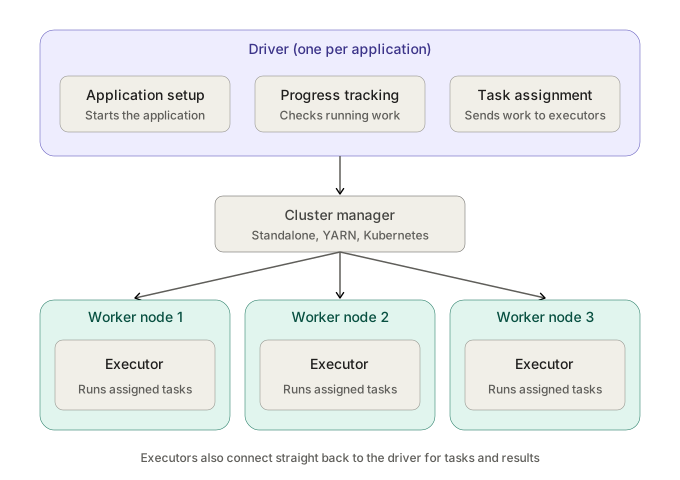
In a typical distributed setup, the driver runs on a driver node, and the workers host executors. The diagram shows one example with three workers. What matters is the relationship between the processes and the machines that host them.
The Spark Driver
I think of the driver as the person tracking the boxes. Each Spark application has a driver process that coordinates its work. It requests resources through the cluster manager. Once executors are available, it sends them tasks and tracks their progress.
The driver needs to stay reachable while the application is running. Executors connect to it directly to receive work and report back. If the driver fails, the application loses the process coordinating it and the current run can fail. A platform may restart the application, depending on how it was launched.
The Cluster Manager
The cluster manager allocates computing resources. It knows what capacity is available across the cluster and arranges for executors to start on workers with enough CPU and memory.
This distinction helped me remember who does what. The cluster manager makes resources available to the application. The driver decides which tasks the application’s executors should run. Spark Standalone, Hadoop YARN, and Kubernetes are examples of platforms that can provide the cluster management role.
Worker Nodes
A worker node is a machine that provides CPU and memory. Adding workers can give the cluster more places to run work. The number of workers that actually contribute depends on what the application is allocated and how much work is ready.
I used to mix up workers and executors. I now picture the worker as the machine on the diagram. The executor is a process running on that machine. When I see a worker type in Databricks, I think about the machine’s capacity.
Executors
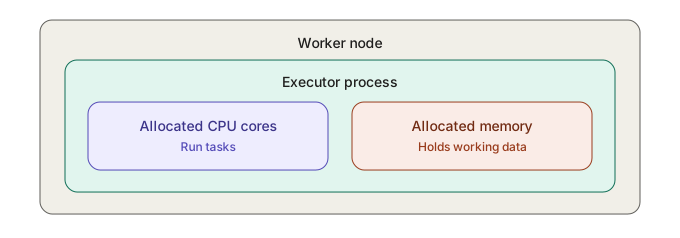
An executor runs tasks for a Spark application. It uses the CPU and memory allocated to it on a worker node. It reports completion, failures, and results to the driver as needed. Tasks can also write their output to storage, depending on what the application is doing.
CPU Cores, Tasks, and Parallelism
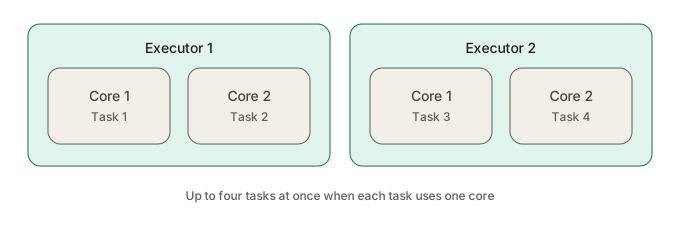
A task is a unit of work the driver assigns to an executor. CPU cores provide capacity to run that work. An executor with multiple cores can run several tasks at the same time.
Suppose I have two executors with two cores each. If each task needs one core, I can run up to four tasks at once, assuming four tasks are ready and the resources are available. If only two tasks are ready, I have spare capacity. More workers or cores give me room for more parallel work when the application has work ready to use them.
How Do the Components Communicate?
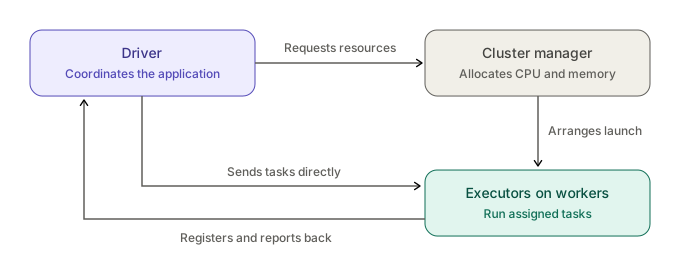
- A Spark application starts and its driver begins coordinating the run.
- The driver requests resources through the cluster manager.
- The cluster manager arranges for executors to start on available worker nodes.
- The executors register with the driver.
- The driver sends tasks directly to the executors. They run the work and report back.
Open the interactive Spark architecture walkthrough.
Spark Architecture in Azure Databricks
In the Azure Databricks workspace I set up for the course, the Compute page is where these roles start to feel less abstract. On classic compute with multiple nodes, the driver node hosts the driver process. The worker nodes host executors. Choosing a worker type means choosing a VM type and its CPU and memory capacity. Classic compute also has a single node option, which runs Spark locally on one machine.
With serverless compute, Azure Databricks manages the underlying infrastructure. I can use Spark without picking driver and worker VM types myself. Microsoft Learn: Compute configuration reference · Microsoft Learn: Classic compute overview
What Happens If a Worker Fails?
If a worker goes away, the driver can retry unfinished tasks on available executors. Spark can also recover calculations when the inputs or outputs it needs can be read again or recomputed. A retry still needs enough cluster capacity and recoverable data. Losing the driver is different because it coordinates the whole application.
What Did I Learn About Spark Architecture?
| Component | What I now picture |
|---|---|
| Driver | The process that coordinates the application and assigns work. |
| Cluster manager | The system that allocates CPU and memory across the cluster. |
| Worker node | A machine that provides space and capacity for executors. |
| Executor | A process that runs tasks and reports back. |
| CPU core | A unit of processing capacity available to an executor. |
| Task | One unit of work the driver assigns. |
The driver coordinates, the cluster manager allocates resources, worker nodes provide computing capacity, and executors run the actual tasks.
Quick Knowledge Check
- Is an executor the same as a worker node? A worker is a machine. An executor is a process it hosts.
- Who allocates cluster resources? The cluster manager.
- Who assigns tasks to executors? The driver.
- Can one executor use multiple CPU cores? Yes. It can run several tasks at once when it has enough cores and work ready.
- What is the difference between a driver and an executor? The driver coordinates the application. An executor runs the work it is assigned.
Related Databricks note. How I Created My First Databricks Catalog with ADLS Gen2?